What Are Some Budgeting Apps? A Family Comparison
What are some budgeting apps for a family? A comparison of shared expense trackers, personal apps, bank-linked aggregators and spreadsheets, and how to choose in a weekend.

Arun Andiselvam
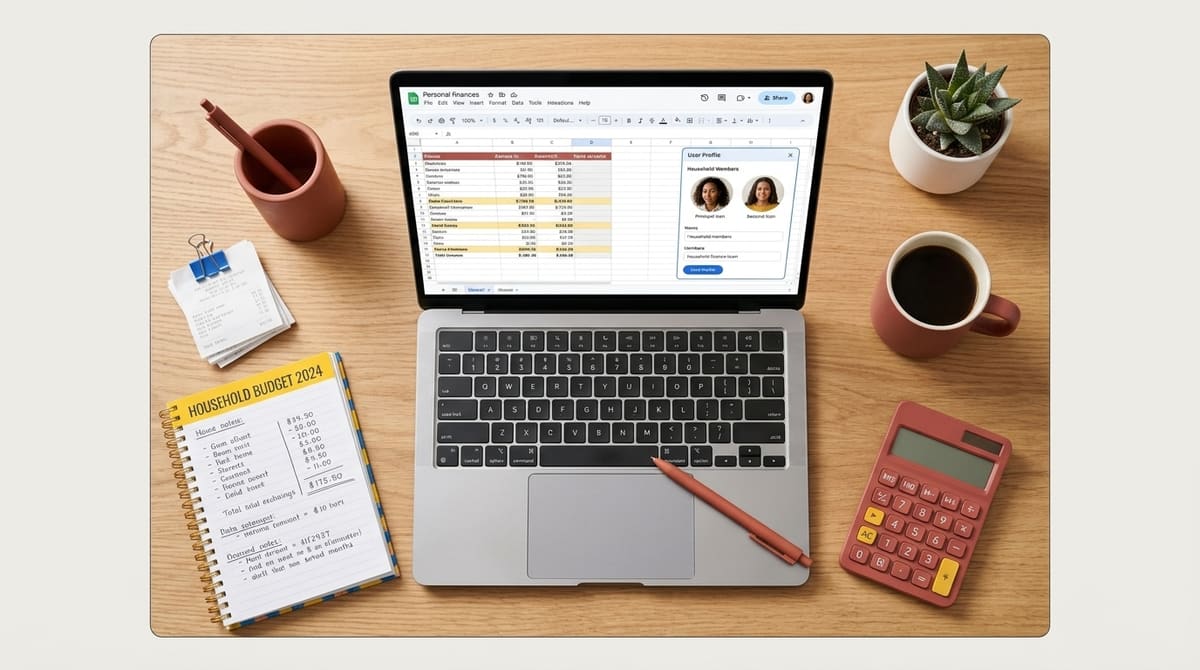
Picture a kitchen argument. Who paid for the gas cylinder? Who covered school fees this month? Why does the grocery bill look bigger than it did in September? These moments are exactly why people start looking for budgeting apps. The question itself is simple. What are some budgeting apps that actually help a household, and not just one person tracking their own coffee habit?
The honest answer is that there are a lot of them. They do very different jobs, and most people pick one that solves a problem they don't have. So before we list anything, let's get the categories straight, because that's where most of the confusion starts. We build Zedger, a shared expense tracker built around separate Books, so we have an obvious interest here. We'll put ourselves first in the list, tell you exactly who we're not right for, and let you decide.
What Are Some Budgeting Apps, and What Kinds Exist?
Budgeting apps fall into roughly four groups. Knowing which group you need saves you weeks of trialing the wrong thing.

Shared expense trackers are built for more than one person. They handle the question of who paid, who owes, and what the household spent as a unit, and this is the category families, roommates, and trip groups actually need. It's also the one most "best budgeting app" lists skip over entirely.
Personal budgeting apps assume one person, one income, one set of categories. They're good at telling you that you spent too much on takeout. They're poor at telling you that your brother-in-law still owes ₹4,000 from the Goa trip.
Bank-linked aggregators pull transactions in automatically from your accounts and sort them into categories. The convenience is real. So is the trade-off. You're handing over credentials or granting access to an institution's feed, and the categorization is often wrong in ways that take longer to fix than manual entry would have taken.
Spreadsheets, which are not apps but absolutely count as a competing option. Some people who've tried a few apps end up back in a custom sheet. We'll get to their reasons shortly.
The reason the question "what are some budgeting apps" has such a scattered answer is that these four categories barely overlap. A tool that's excellent at forecasting your personal cash flow might have no concept of a second person at all. A tool that splits a dinner bill perfectly might have no sense of a monthly budget. Once you know which problem is actually bothering you, the shortlist gets short fast.
Zedger: Separate Books for Family, Trips, and Recurring Bills
We'll start with ours, and then we'll be fair to everything else.
Zedger is a mobile app for tracking and splitting shared expenses. The core idea is Books, separate ledgers for different purposes. Your Family Book holds household spending: groceries, electricity, school costs, the plumber. A Trip Book holds one trip, with its own members and its own currency. A Recurring Book handles the monthly stuff that repeats whether you log it or not, things like rent, maintenance, subscriptions, and EMIs. The Fundraising Tracker App handles the fifth thing nobody has a tool for, collecting fixed or variable contributions for a farewell gift or a society fund.
Why does separating Books matter? Mixing them is the single most common reason people abandon a budgeting app. When your Mumbai trip, your rent split, and your family grocery spending all live in one scrolling list, nothing reads clearly.
You can't answer "what did we spend on the house this month" without mentally subtracting three weekends away. Separate Books mean each question has its own clean answer.
A few specifics worth knowing:
- No bank linking. We never ask for bank credentials, UPI access, or OTPs. You enter what you spend. That's a deliberate choice, and we know it costs us the "automatic" convenience some people want.
- Offline-first. You can add expenses with zero signal and they sync when you reconnect. This matters in hill stations, on trains, and in basements.
- Smart Settlements. Instead of five people making eleven payments, the app works out the fewest transfers needed to square everyone up.
- Local storage option for data you'd rather not keep on a server.
- A growing number of families are using the app.
Pricing: the Free plan gives you 6 months of expense history, 4 Books, and 10 members per Book, enough for a family plus a trip plus the monthly bills. Pro is $1/month or $8.99/year, VIP is $1.99/month or $17.99/year, both saving 25% annually. The trial doesn't need a card and you can downgrade whenever.
Who we're not for: if you want automatic bank feeds, investment tracking, or a net-worth dashboard, we don't do that and won't pretend to. If you want a shared ledger that your whole household will actually keep using, the Family Expense Tracker App is where to start.
Expense Tracker App Features That Actually Matter for a Household
Feature lists are long and mostly padding. Here are the expense tracker app features that change whether a household sticks with a tool past week three.
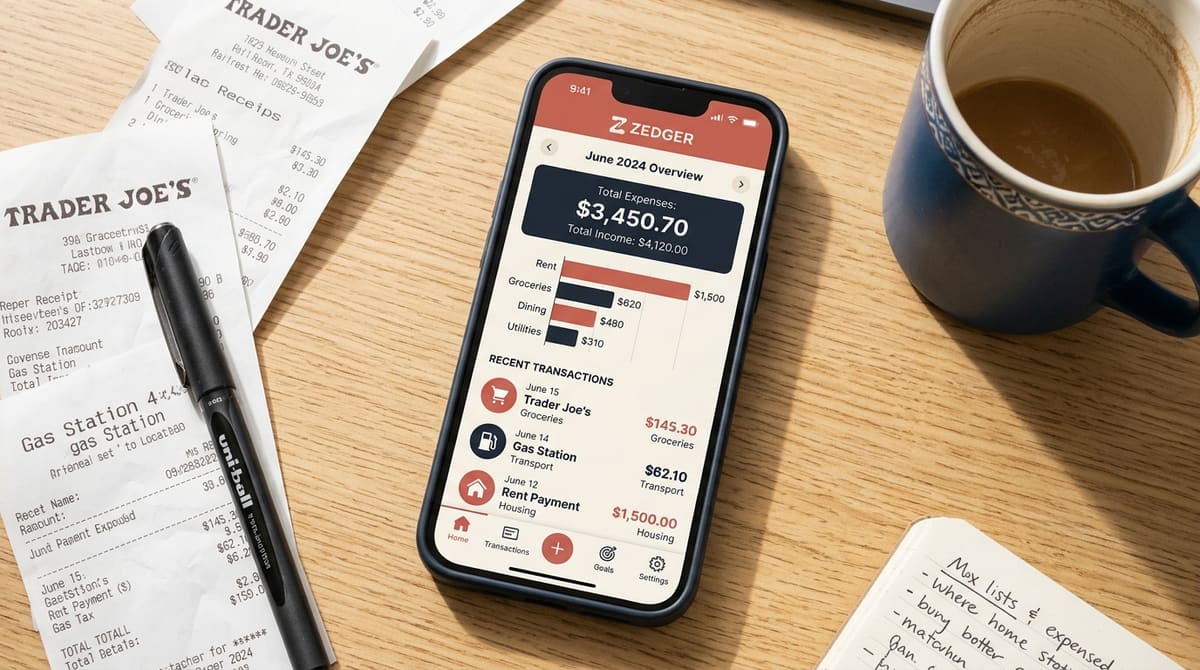
Multi-person entry. Can two or more people add expenses to the same ledger, on their own phones, and see each other's entries? If not, one person becomes the household accountant and quits within a month. This is the single biggest differentiator between personal budgeting apps and genuine household expense tracking software.
Separation of contexts. The ability to keep a trip, the rent, and the groceries in separate ledgers rather than one list with tags. Tags help, but they still leave everything in one scrolling feed.
Recurring entries. Rent and subscriptions repeat on a schedule. Any app that makes you type them in manually every month is quietly training you to stop using it. One of the most useful structural moves we see households make is to automate the fixed, predictable bills, things like rent, maintenance, and broadband, and then spend their actual attention on the discretionary stuff like groceries and eating out, where decisions still change the outcome. The fixed bills don't need daily review. The variable ones do.
Offline capability. Not a luxury if you travel, and not a luxury on Indian mobile networks generally.
Multiple income sources. Households with freelance income, rental income, or two earners paid on different cycles need a tool that can hold more than one scheduled, repeating income stream. Plenty of apps allow exactly one, which makes any weekly or monthly projection it produces quietly wrong.
Export and categorization that's simple. You'd think this would be universal. It isn't. Some users of otherwise sophisticated tools find that basic things, like categorizing a transaction or downloading your data as a file, are buried or missing while elaborate features nobody asked for sit on the home screen.
Settlement logic. For groups, the difference between "here's who owes what" and "here are the three payments that settle everything" is the difference between a resolved month and an awkward WhatsApp thread.
Those are the expense tracker app features worth testing in your first week. Everything else is decoration.
What Is the Best App for Tracking Daily Expenses?
When people ask what is the best app for tracking daily expenses, they usually mean something narrower. Which one will I still be opening in March?
Daily expense tracking fails for a boring reason. It takes effort. That effort is spread across several small moments, and most apps add friction at exactly the wrong point. If logging a ₹120 auto ride takes six taps and a category dropdown, you won't do it on the fourth day.
So the honest answer to what is the best app for tracking daily expenses is this: the one with the shortest path from opening the app to a saved entry, that also works when your signal drops. Speed beats sophistication. An app that captures 90% of your spending because it's quick tells you more truth than one that captures 40% because it's thorough.
A second consideration for households: daily tracking only works if everyone does it. If your partner has to tell you what they spent so you can enter it, you've built a reporting bottleneck, not a tracking system. Shared entry isn't a nice-to-have for daily use. It's the whole thing.
Third, watch for duplicates. Bank-linked apps have a persistent habit of showing the same transaction twice, or counting a transfer between your own accounts as spending. The result is numbers that look wrong, and once the numbers look wrong, nobody trusts the app. Manual entry is slower, but what you enter is what happened.
If you want a longer side-by-side of the main options with household use cases, we've written one up in our guide to the best family budgeting apps.
Household Expense Tracking Software: Shared Tools vs. Personal Apps
There's a category gap worth naming plainly. Most of what gets marketed as budgeting software is built for one person's money. Household expense tracking software is a different animal, and the differences aren't cosmetic.

A personal app asks: what did I spend, and against which budget? A household tool has to answer numerous questions at once, what did we spend, who paid, who owes, and across which of our shared contexts. That's not a feature you bolt on. It changes the data model.
This is why households often end up running two things: a personal app for individual spending and something else for shared costs. That's workable, though it means two places to look. The alternative is household expense tracking software that handles the shared layer properly and lets each person keep whatever personal tracking they like on the side. We lean toward the second approach, partly because the shared layer is where the arguments happen.
Roommates see this most sharply. The friction in shared living is almost never about the rent, which is fixed and obvious. It's about groceries, the gas bill, and the slow accumulation of small resentments about who's covering more. Putting those into a shared ledger that everyone can see ends the arguing. Not because the app is clever, but because the facts stop being disputed. That's a genuinely underrated benefit of dedicated tools over mental accounting.
For families, the dynamic differs. Most families don't want debt-style tracking where every rupee creates an IOU between spouses, since what they want instead is a shared record of what the household spent, with the option to track who contributed. That's a different mode, and a tool that forces strict split-and-settle on a married couple feels wrong immediately.
Bank-Linked Apps: Convenience Against Privacy
This is the fork in the road, so it's worth being direct about both sides.
Bank-linked apps import transactions automatically. You don't type anything. For people who hate manual entry, which is most people, that's a powerful pitch, and we won't pretend otherwise.
The costs are real too. First, privacy: you're granting a third party access to a feed of everything you spend, and the terms around what happens to that data vary a lot and change over time. Plenty of people in India are simply not comfortable giving an app access to banking credentials or OTPs, and that caution is reasonable rather than paranoid.
Second, accuracy. Automatic feeds produce duplicate entries, miscategorized merchants, and inflated totals with enough regularity that "fixing the import" becomes its own monthly chore. Cash spending, which remains common in Indian household expenses, doesn't show up at all. A shared household expense doesn't become a shared expense just because it hit one person's card. The app has no idea it should be split four ways.
Third, it doesn't solve the group problem. Your bank feed knows you paid ₹6,200 for a hotel. It does not know that four people were in the room.
Zedger doesn't link to banks. We ask you to enter expenses, and we try to make entry fast enough that it's not a burden. We think that's the right trade for shared money specifically. If your main pain is "I don't know where my own salary goes," a bank-linked personal app might genuinely serve you better, and you should use one.
The Spreadsheet Option, and Why People Keep Going Back
We'd be dishonest to leave spreadsheets out of a list of budgeting options. A lot of capable people use them, and some have left apps to go back.

The reasons are consistent. A custom sheet shows exactly the categories you care about, isolated, with charts you built. That isolation makes overspending impossible to ignore. When the "eating out" column has its own bar and it's taller than last month's, no app design hides it in a summary. Some people also build their own bill-splitting setups in a shared sheet, with automated reminders attached, and get results that fit their situation better than a generic app's rules do.
The downsides are equally consistent. Spreadsheets on a phone are miserable, which means entry happens later or not at all. They don't work well offline on mobile. The person who built the sheet becomes the only one who can maintain it, and when they get busy, the system dies. No spreadsheet does Smart Settlements either. You'll be doing the "who pays whom" math yourself.
Our honest read: if you're a spreadsheet person with a stable setup and the discipline to maintain it, you might not need an app at all for personal budgeting. Where sheets break down is group use, mobile entry, and anything where five people need to add data from five phones in five places. That's the specific gap apps fill.
Why Do Budgeting Apps Charge Monthly, and What Should You Pay?
A fair question people keep asking: why does a budgeting app cost a monthly subscription when plenty of financial tools are free or close to it?
Part of the answer is that free apps are usually monetized some other way, through ads, data, or upsells to financial products. Part of it is that syncing across devices and people costs something to run. And part of it, frankly, is that some pricing is set by what the market will bear rather than what the product costs.
What we'd suggest you look for:
A free tier that's actually usable, not a seven-day countdown. Our Free plan gives you 6 months of history, 4 Books, and 10 members per Book. That's a real household setup, not a teaser.
No card for the trial. If you have to enter card details to look around, you're being enrolled in a subscription you haven't decided on yet.
Downgrade without drama. You should be able to drop to free and keep your data.
Pricing proportional to the job. A shared expense tracker is not a financial planning suite and shouldn't be priced like one. Zedger Pro is $1/month or $8.99/year. VIP is $1.99/month or $17.99/year. Both annual options save 25%.
For housing societies, apartment associations, and larger organizations with a lot of members and contributors, there's a separate path, custom deployments through Contact Sales rather than stacking individual plans.
Forecasting, Prediction, and What No App Does Well Yet
One gap runs across the whole category, and it's worth saying plainly instead of pretending someone has solved it.

People want a single tool that does real-time tracking and reliable forecasting. Something that shows what's been spent so far this month, and tells you where you'll land on the 30th, accounting for the bills that haven't hit yet. Almost nothing does both well. Tracking apps are backward-looking. Planning tools are forward-looking and need you to maintain assumptions by hand. The handoff between them is where people give up.
The workaround that holds up best is structural rather than technological. Separate the fixed from the variable. Fixed costs, things like rent, maintenance, insurance, and subscriptions, are known in advance. Park them in a Recurring Book and automate the payments where you can, so they need attention once a year rather than once a month. Then you only need to forecast the variable half, which is a much smaller and more honest exercise. If you know your fixed outgoings and you've got two weeks of grocery and transport spending in front of you, you can estimate the month's landing point yourself in about a minute.
Households with irregular or many income streams need the same discipline on the income side. If a tool only lets you set one recurring income, any projection it gives you is built on a wrong number. Either find one that handles several, or do the income side manually and use the app purely for the spending record. We'd rather tell you that than imply any app has cracked prediction.
How to Pick One in a Weekend
A short process that avoids the three-apps-in-three-months cycle.
Name the actual problem first. Write one sentence. "We don't know what the household spends each month." "Nobody remembers who paid on trips." "The flatmates argue about groceries." "I need to collect ₹500 from 22 people for a farewell gift." Each sentence points to a different tool, and some point to more than one.
Shortlist two, not six. Comparison paralysis is real, and the differences between options four, five, and six are rarely decisive.
Start the test itself with a full week, not a quick glance. Run a one-week live test. Not a browse-the-features test. Enter every real expense for seven days, with everyone who'll be using it. You'll learn more in that week than in an hour of reading lists like this one.
Check three friction points specifically: how many taps it takes to log an expense, whether it works with your phone in airplane mode, and whether your least tech-interested household member managed to add anything at all without being asked twice.
Then check the exit. Can you export your data? If the answer is no or it's hidden, that tells you something about how the company sees you.
If after that week the app is still open on your home screen and someone other than you has used it, you've found your answer. That's a better signal than any feature comparison.
Frequently Asked Questions
Is my financial data safe in an app like this? Zedger uses encryption and doesn't sell user data. We also don't ask for bank credentials, UPI access, or OTPs, so there's no banking access to compromise in the first place. For anything especially sensitive, there's a local storage option so data stays on your device rather than only on servers. We're not a bank and don't claim regulatory certification or insurance protections. What we offer is a smaller attack surface by design.
Will I get stuck paying for something I don't need? The Free plan is permanent, not a trial countdown, and the paid trial doesn't require a card. You can downgrade at any point.
Isn't this just another cluttered finance app? That's the complaint we hear most about the category, too complicated for foundational budgeting, with easy things like categorizing a transaction or downloading your data buried under features nobody uses. Zedger is four focused tools: Family Book, Trip Book, Recurring Book, and the Fundraising Tracker App. We'd rather do those four well.
Does it work without internet? Yes. Add expenses offline and they sync automatically when you're back online.
Can it handle multiple currencies? Yes, which matters for trips abroad and for groups with members in different countries.
Start With One Book
If the question you came in with was what are some budgeting apps worth trying, here's the compressed version: pick based on whether your money problem is personal or shared, don't pay for forecasting nobody has perfected, and test for a week with real expenses before you commit.
If your problem is shared, a household, a flat, a trip, or a group fund, start with one Book and see if it survives the week.
GET IT ON Google Play · Download on the App Store · Housing society or larger organization? Contact Sales
Tags: